
The short version
- Android daily driver: install the APK. Icon, push alerts, no address bar.
- iPhone: H5 only; there is no iOS package. Safari handles it fine.
- Borrowed or work phone: H5 leaves nothing installed.
- Trying before committing: H5 now, APK later; the account carries over.
Side by side
| APK (3.28 MB) | H5 in browser | |
|---|---|---|
| Install | One file, two prompts, two minutes | None |
| Works on | Android 7.0+ Android | Any modern browser, iPhone included |
| Entry | Home-screen icon | Link or bookmark; add-to-home-screen if you like |
| Notifications | Push for contests and promos | None |
| Updates | In-app prompt or manual file | Always current, nothing to do |
| Storage | About 15 MB installed | Browser cache only |
| Account and wallet | Shared: log in with the same number on both | |
What the H5 looks like
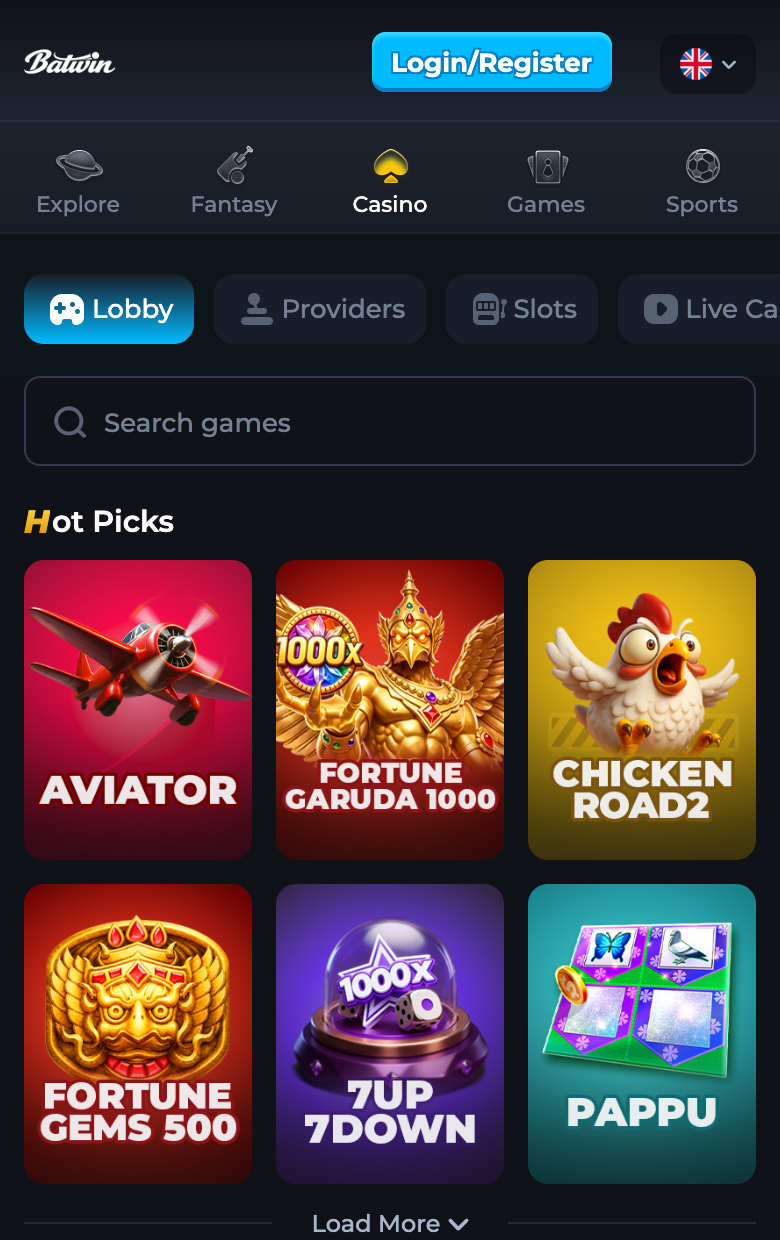
The H5 lobby mirrors the app's five tabs: Explore, Fantasy, Casino, Games, Sports. Match cards show prize pools before entry, the casino's Hot Picks row is identical, and the five free-to-play titles are all present.
On a desktop? Scan the QR with your phone camera and the lobby opens where you will actually play.

Switching later costs nothing
Start in H5 today, install the APK next week, log in with the same number: wallet, matches and rewards are account-level, not device-level. The reverse works too; uninstalling the app does not touch the account.